
Finding an opportunity is only one part of recruiting. You also need a system for tracking applications, managing documents, following up, and making sure promising opportunities don’t slip by. 12twenty has several tools that can help.

Apply Through 12twenty First
If you find a job in 12twenty that is also posted on an employer’s website, always complete the 12twenty application first.
Employers who post opportunities in 12twenty have specifically indicated an interest in recruiting Rice Business MBAs. Applying through 12twenty helps ensure your application is included in that Rice Business candidate pool and may give it additional visibility with the employer.
Always read the application instructions carefully. Some employers require students to apply both through 12twenty and through the company’s career site. When that is the case, submit through 12twenty first and then complete the employer’s application as the second step.
Applying through 12twenty also allows the Career Development Office to better understand recruiting activity and support students throughout the process.
Create Saved Searches and Email Alerts
You don’t need to start your search from scratch every time you log in.
Saved searches are available in both Events and All Job Postings and can help you automatically stay aware of opportunities matching your interests.
Start by applying filters based on what you are looking for. Then select “Turn on email alerts for this search” in the blue bar at the bottom of the screen.

You can name the search, choose how frequently you want to receive alerts, and save it for future use. We recommend setting up an alert for your Target Companies by adding the filter “From My Target Employers” and select “Yes” for both Events and Job Postings.
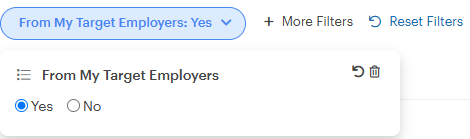
Then turn on email alerts for that search.
Consider creating several focused searches rather than one extremely broad search—for example, one by industry, another by function, or one focused on a particular location.
Keep Your Application Materials Organized
The Application Materials section allows you to upload and manage resumes, cover letters, transcripts, and other recruiting documents.
A few best practices:
- Upload multiple resume versions when you are targeting different industries or functions.
- Consider including the industry or role in the file name so you can quickly distinguish between versions.
- Always upload resumes as PDFs unless instructed otherwise.
- Include your name in the file name.
- Select a primary document, but don’t assume your primary resume is the right resume for every application.
- Attach the version most relevant to the specific role when applying.
- Remove or replace outdated documents as your materials evolve.
A clear file name such as jordan_Rice_Consulting_Resume.pdf is much easier to manage than something like Resume Final New 2.pdf.
Opt Into Resume Books
Resume books give employers another way to identify students who may fit their hiring needs.
Visit the Resume Books page periodically to see which books you are eligible to join and opt into the ones that align with your interests.
Don’t assume that because your resume is uploaded to 12twenty, it is automatically included in every resume book. Review available opportunities and opt in where appropriate.
Read Job Postings Carefully
Not every opportunity follows the same recruiting process, so take time to review the full posting before applying.
Pay particular attention to:
- Application deadlines
- Eligibility requirements
- Work authorization requirements
- Required application materials
- Whether an application on the employer’s career site is also required
- Any additional instructions provided by the employer
Some opportunities may also have short application windows, so don’t assume a role you see today will still be available later.
This is the second of a four-part blog series on 12twenty. If you haven’t yet, check out the first blog “Make 12twenty Work for You”.


